![Formalize-Logo.png]](https://support.formalize.com/hs-fs/hubfs/Formalize-Logo.png?height=33&name=Formalize-Logo.png)
Overview
This feature helps you manage evidence more efficiently by allowing a single piece of evidence to be reused and updated across multiple controls, frameworks, and suppliers. By using submissions, you can keep evidence versioned and traceable without breaking existing links, ensuring your documentation stays accurate, consistent, and audit-ready.
How to add an evidence submission
For general information on the Evidence module, go to our Evidence Management article.
There are two parts of the platform from where you can submit an evidence: from a control inside of the Frameworks module, or from the Evidence module.
How to add an evidence submission from a control
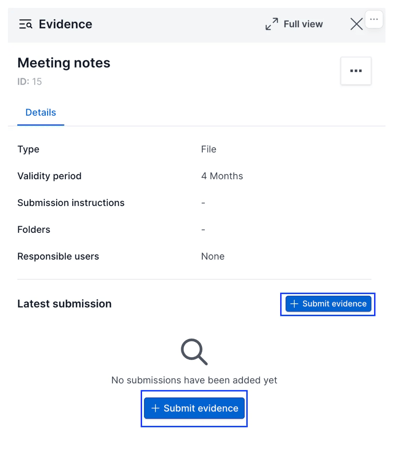
- Click on the evidence, then on + Submit evidence.
- Fill in mandatory fields: collection date is always mandatory. Depending on the type of evidence, Upload file or External link could also be compulsory.
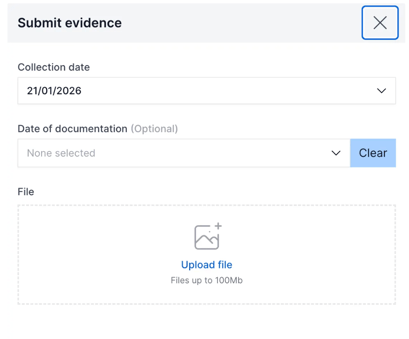
- After filling in all data, click on Save.
- You can now see your submission from the Latest Submission card. Only the latest submission will be visible, but all can be seen in the log via View All.
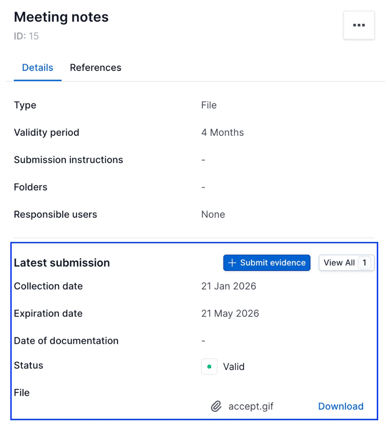
If you want to delete or edit an already completed submission:
-
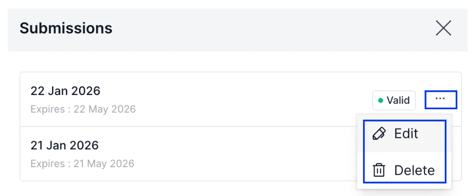
Click on View All to see all submissions for the evidence.
- Click on the three dots next to the relevant submission and select Edit or Delete.
How to add an evidence submission from the Evidence module
-
Click on a piece of Evidence from the table overview. Once in the detail page, click + Submit evidence.
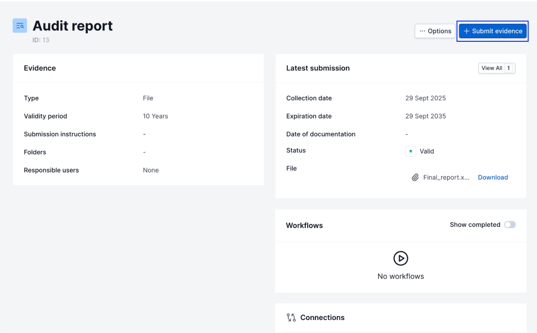
- From this point, repeat the steps outlined from steps 2-4 of “How to add an evidence submission from a control.”
See also the following articles:
Common Questions
- What do you mean by submission?
Submissions are versions of an evidence. Updating evidence via submissions preserves existing links, enabling updates to apply across multiple controls or frameworks at once.
- What can I use evidence submissions for?
There are many use cases where this feature could be useful. Some examples could include:-
Audit & Compliance Management: Maintain versioned, traceable evidence across controls and frameworks while ensuring documentation remains audit-ready without breaking existing links.
-
Supplier Management: Reuse the same evidence across multiple suppliers, controls, and frameworks, updating it once without duplication or rework.
- Incident Management: Capture evolving evidence throughout an incident lifecycle while preserving historical submissions and accountability.
-
by María Amparo Soriano Varela, Customer Enablement Manager
We hope this article was helpful and that you now have a clear understanding of how to use Evidence Submissions in Formalize!If you need additional support, don't hesitate to reach out us by email at support@formalize.com