![Formalize-Logo.png]](https://support.formalize.com/hs-fs/hubfs/Formalize-Logo.png?height=33&name=Formalize-Logo.png)
Overview
The Risk module in Formalize provides a structured workflow for identifying, assessing, and managing risks. By combining configurable risk types, approval flows, mitigation fields, and custom fields, the module ensures flexibility while supporting consistent risk governance across the organization.
The Risk Module overview
Navigate to the Risks Module
- In the main menu, select Risks.
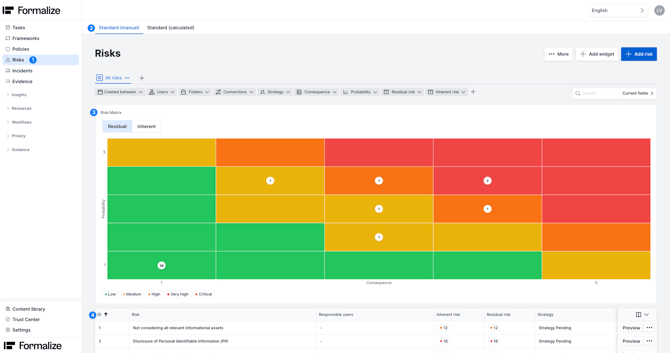
- You will now see:
- Tabs for each risk types
-
- The Risk Matrix, showing probability × consequences positioning for all risks
- A complete list of all your existing risks in each risk type
Create New Risk
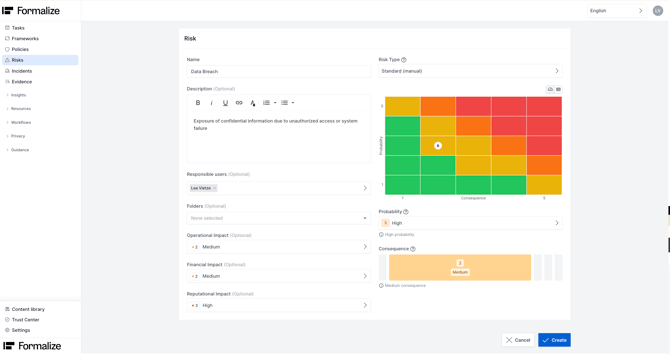
In the upper-right corner, select + Add Risk to open the risk creation window. Here, you can enter the fundamental details of the risk you would like to create.
Fill in all needed Information
- Name of the risk
- Short description of the risk
- Responsible User
- Risk type (default or custom types you created in settings)
- Probability value
- Consequences value
Probability and consequence values determine the Risk Score, which is automatically calculated according to your risk type settings - Any created custom field (here these are the impact fields, calculating the consequence)
Once the risk is saved and created, you can establish Data connections to relevant data entries within the account. These connections help ensure clearer traceability of where the risk has an impact and support integrated risk management.
Related Articles:
- Risk Settings
- Responsible User
- Data Connections

by Lea Vietze, Solutions Engineering Team Lead
We hope this article was helpful in gaining more understanding of Manual Risk mitigation!
For any additional support, you are welcome to reach out with any questions by email, at support@formalize.com.